
Co-parenting: Shared Parenting
Happy Parents ABCommunication
4.126.00 Reviews
- Version
- 1.105.3
- Installs
- 10.00K
- Age Rating
- Everyone
Screenshots
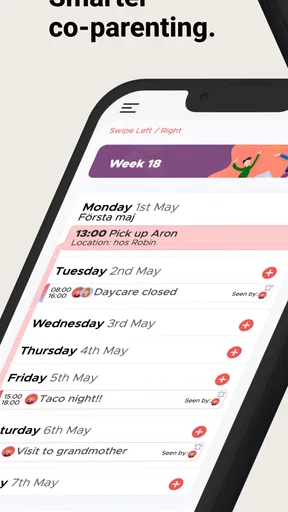
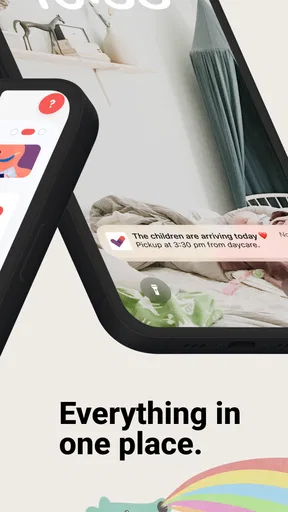
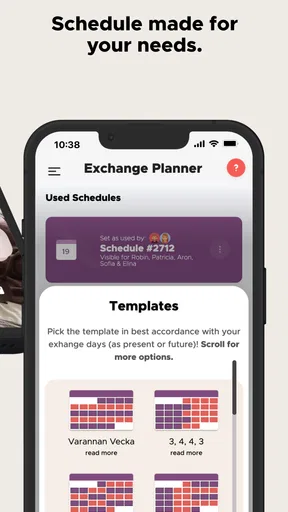

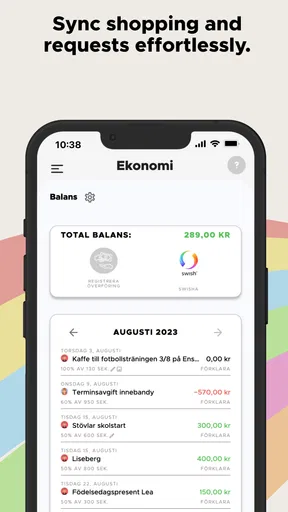


Our Review of Co-parenting: Shared Parenting
 Analysis by Appyee
Co-parenting becomes difficult when ordinary details are scattered across text messages, memory, paper notes, and separate calendars. A change to a pickup time can quickly turn into a disagreement about what was decided, while shared costs and small tasks get forgotten in the same conversation. I reviewed Co-parenting: Shared Parenting as a communication app built around bringing those pieces together, and I found its strongest idea to be simple: turn recurring parenting coordination into a shared record rather than a stream of disconnected messages.
The app is developed by Happy Parents AB and is free to download, with optional in-app purchases priced from $7.49 to $9.49 per item. It is rated for Everyone, runs on Android 9 and later, and its current version is 1.105.3. Its average rating is 4.1 from roughly a hundred ratings, with a couple dozen written reviews, and it has passed ten thousand installs. Those figures suggest a small but established user base rather than a huge mainstream platform, which is useful context when deciding whether you want a focused co-parenting tool or a more general family organizer.
From a messy parenting situation to one shared plan
I’d begin by deciding which parenting details deserve a shared record, because a clear boundary can make a new system easier for both parents to adopt. I’d keep routine changes and handoff responsibilities in view, while leaving unrelated conversation where it naturally belongs. That distinction helps explain why the next step is not adding every detail, but building a plan around the moments that most often need coordination.
The starting condition: too many conversations and not enough clarity
The app makes the most sense when both parents are trying to cooperate but the practical side of that cooperation keeps slipping. Imagine a Wednesday evening: one parent has the child, the other is preparing for the weekend, and a school activity has changed the usual handoff. In a normal messaging app, the change may be buried among unrelated messages. In a shared calendar, the event might be visible, but the expense for the activity and the task of bringing equipment may still live elsewhere.
That is the problem this app is designed to address. Its core tools cover a custody calendar, a shared expense area, to-do lists, and a TalkSafe AI chat. I like that these functions correspond to different kinds of coordination instead of pretending every parenting issue is just a calendar entry. Time belongs in the schedule, money belongs in expense tracking, responsibilities belong in tasks, and difficult wording can be approached through a dedicated chat experience.
I would not treat it as a replacement for every conversation between parents. A shared parenting arrangement still needs direct communication, judgment, and sometimes professional support. The app is more useful as a neutral workspace for the repeatable parts: who has the child, what needs doing, what was spent, and how a message is framed before it becomes another source of tension.
Step one: establish the custody calendar before adding extras
I would begin with the custody calendar, even if the immediate temptation is to test the AI chat. The schedule is the foundation because every later task or expense makes more sense when connected to a particular period of care. Start by entering the regular pattern as accurately as possible, then add exceptions such as school events, holidays, appointments, or a one-off swap.
The practical benefit is not merely seeing colored blocks on a screen. A shared calendar gives both parents a common reference point before a handoff is discussed. That changes the tone of a conversation. Instead of writing, “I thought you had them this weekend,” a parent can look at the same schedule and discuss the actual exception. For families with a predictable routine, this can reduce unnecessary back-and-forth.
My advice is to use the calendar for decisions that affect responsibility, not every detail of the child’s day. If it becomes overloaded with minor notes, the important handoff information becomes harder to spot. Keep the main custody pattern clear, and use a related task for something like packing sports clothes or returning a library book. That separation is one of the more useful workflows available here: the calendar answers when, while the to-do list answers what still needs to happen.
Step two: turn the next handoff into a checklist
Once the schedule is clear, I would create a short to-do list for the next transition. This is where the app can move from passive record-keeping to practical coordination. A handoff often involves several small actions: medication, school materials, a favorite toy, permission paperwork, or a reminder about an upcoming appointment. None of these is difficult alone, but forgetting one can create friction that lasts longer than the task itself.
The best use of the list is to assign responsibility in plain language. Rather than writing a vague note such as “weekend preparation,” break it into actions that can be understood without another explanation. A parent can then check the list while preparing the child, and the receiving parent can see what has already been handled. This is especially helpful when the child moves between homes on a busy school day.
There is a trade-off. A task list only helps if both parents actually maintain it. If one person records every detail while the other continues using private notes, the shared view becomes incomplete. I would keep the list deliberately small and time-sensitive. It should support the handoff, not become a second administrative job.
Step three: record expenses at the moment they happen
Shared expenses are another area where timing matters. I would add a cost soon after paying it, while the amount and reason are still fresh. Waiting until the end of the month makes it harder to remember whether something was a school purchase, a medical item, clothing, or an optional activity. A shared expense tracker is most valuable when it prevents a later reconstruction of events.
A useful habit is to agree on a simple naming style before using the feature seriously. For example, describe the purpose clearly and avoid emotional labels. “School trip supplies” is easier to review than “another thing I had to buy.” This may sound minor, but neutral wording matters when an expense list is later used to settle a disagreement. The app can organize the record, but the parents still control whether the record feels factual or accusatory.
I also see an important limitation here: tracking an expense does not automatically resolve how parents should divide it. The app can help make the spending visible, but families may still need their own agreement about approvals, reimbursement timing, or exceptional costs. If you expect the software to calculate every financial obligation according to a legal or personal arrangement, you may find the workflow too narrow. It works better as a shared ledger for discussion than as an authority on what each parent owes.
Step four: use TalkSafe AI as a drafting pause
The TalkSafe AI chat is the most distinctive part of the package, but I would use it carefully. Its value is not that it can decide who is right. Its value is that it offers a pause between feeling frustrated and sending a message. When a schedule change, missed task, or disputed cost is emotionally charged, a parent may need help turning a reaction into a practical request.
My preferred workflow would be to describe the situation briefly, identify the outcome needed, and then review any suggested wording before sharing it. For example, the goal might be confirming a pickup time or asking for an expense to be acknowledged. The important step is the human edit afterward. I would remove anything that sounds unnatural, check every factual detail, and make sure the message reflects the actual parenting agreement.
This is also where I would be most cautious about privacy and sensitivity. Parenting conversations can contain personal information, and an AI assistant should not be treated as a confidential counselor, legal adviser, or substitute for safeguarding support. The feature may help with tone, but it cannot understand the full history of a family conflict from a short prompt. If there is intimidation, abuse, a serious welfare concern, or a legal dispute, I would choose appropriate professional help instead of relying on an in-app chat.
The handoff: where the separate tools become useful together
The strongest workflow is not opening one feature in isolation. It is moving from calendar to tasks to expenses, with the chat used only when communication needs extra care. Consider a child moving from one parent’s home to the other after school. The calendar establishes who is responsible. The task list shows that a school project and medication need to travel with the child. The expense area records a recently purchased item. If a timing problem appears, TalkSafe AI can help draft a calm message focused on the immediate solution.
This sequence reduces the need to explain the entire background every time. Both parents can look at the same practical information, and each handoff leaves behind a clearer record for the next one. That is a more meaningful advantage than simply having several tools in one app. The benefit comes from using each tool for its intended job and avoiding the temptation to put every detail into chat.
For this to work, both parents need access and a willingness to update the shared information. The app cannot make an uncooperative person responsive, and it cannot guarantee that a calendar entry will be read before a handoff. I would introduce it during a calm period, agree on what belongs in each section, and use a low-stakes event first. That gives both people a chance to learn the routine before a holiday change or urgent appointment tests it.
The result: less reconstruction, clearer responsibility
After a few cycles, the realistic result is not perfect harmony. It is less time spent reconstructing what happened. A parent can check the schedule instead of searching old messages, review a task instead of asking whether something was packed, and see an expense in context instead of raising it from memory. Those small reductions in uncertainty can make routine coordination feel less personal and less exhausting.
I think the app is particularly well suited to parents who are separated but still able to share basic information in good faith. It can also help families with alternating weeks, regular weekend arrangements, changing school commitments, or many small child-related purchases. The more often responsibility moves between homes, the more valuable a common record becomes.
It is less convincing for someone who only needs a normal calendar. If your family already uses a shared calendar consistently and handles money through a separate system without confusion, adding another app may create more maintenance than value. It is also not the right choice for a parent looking for a full legal case-management system, a therapy service, or a substitute for direct safeguarding support. The focused design is a strength for everyday coordination, but it also defines the app’s limits.
Where the flow breaks: friction I would plan for
The first likely break is inconsistent participation. A shared tool depends on shared habits, and one parent can undermine the system simply by continuing to send changes through scattered messages. The solution is not to record everything twice. Instead, agree that schedule changes go into the calendar, practical preparation goes into tasks, and costs go into expenses. The fewer rules you create, the easier they are to follow.
The second break is over-documentation. Parents who are anxious about being misunderstood may be tempted to record every exchange, every minor purchase, and every small task. That can make the app feel like surveillance rather than cooperation. I would keep entries factual, brief, and connected to a real parenting need. A clean record is more useful than a detailed one that no one wants to maintain.
The third break is treating AI wording as automatically appropriate. A polished message can still be inaccurate, too formal, or unsuitable for the relationship. Read it as a draft, not a verdict. Make sure the requested action is specific, the timing is correct, and the message does not introduce assumptions that were not part of the original situation.
There may also be friction around the optional purchases. The app itself is free, but some items cost between $7.49 and $9.49, so I would check which functions or content require payment before building a family workflow around them. A free starting point is helpful, yet a shared arrangement becomes harder if one parent expects access to something the other does not want to purchase. Discuss that before relying on a paid element for an important routine.
Who should install it, and who should look elsewhere?
I would recommend giving it a serious try if your main problem is coordination across two homes. The combination of custody scheduling, shared costs, tasks, and communication support is more targeted than a generic calendar or a family messaging group. It is especially appealing when the same issues recur: missed handoff items, unclear schedule changes, and expenses that are remembered only after frustration has built up.
I would skip it if the other parent will not participate, if your needs are limited to occasional calendar sharing, or if you require formal legal documentation and professional case support. In those situations, a standard calendar may be simpler, while a dedicated legal or support service may be more appropriate. The app is a practical coordination layer, not a solution for every kind of co-parenting conflict.
For me, the deciding question is whether the family needs one shared place for recurring responsibilities. If the answer is yes, Co-parenting: Shared Parenting offers a sensible workflow: set the custody pattern, prepare the next handoff with tasks, record costs while they are fresh, and use the TalkSafe AI chat as a moment to slow down before sending a difficult message. Its value grows through consistent use, not through any single feature.
My final impression is positive but measured. Happy Parents AB has focused the app on the practical gaps that make shared parenting tiring, and the current release provides a useful structure for turning those gaps into visible actions. I would start with one upcoming handoff, keep the entries neutral, and see whether both parents actually use the same process. If they do, the app can make everyday coordination clearer; if they do not, no calendar or chat assistant can compensate for the missing cooperation.
Verdict
Strengths of Co-parenting: Shared Parenting
- Shared calendars make custody schedules easy to view and update.
- Keeps messages, notes, and parenting records organized in one place.
- Useful reminders help prevent missed pickups, appointments, or activities.
- Supports clearer communication without requiring frequent phone calls.
- Can reduce misunderstandings by keeping shared information time-stamped.
Limitations of Co-parenting: Shared Parenting
- Some useful features may require a paid subscription.
- Both parents need to use the app consistently for it to work well.
- Notifications can become distracting when schedules change frequently.
- Privacy settings should be reviewed before adding sensitive family information.
- The interface may feel unnecessary for parents with simple arrangements.
Similar Picks in This Category
View All
Google Messages
Google LLC4.6

Gmail
Google LLC4.1

Google Meet
Google LLC4.4

Google Chrome
Google LLC4.1

WhatsApp Messenger
WhatsApp LLC4.6

Carrier Services
Google LLC4.2
Frequently Asked Questions
What is Co-parenting: Shared Parenting, and who is it designed for?
Co-parenting: Shared Parenting is designed to help separated or divorced parents organize the practical details of raising a child together. After reviewing its features, the app appears most useful for managing schedules, appointments, school activities, messages, expenses, and shared responsibilities in one place. It can be especially helpful when parents want clearer communication and fewer misunderstandings, although both parents may need to participate for the best results.
Can both parents use the app to manage schedules and parenting responsibilities?
Yes, the app is intended to support shared access between co-parents. Parents can typically coordinate custody arrangements, visitation times, school events, holidays, and other important activities through a common system. This can make schedule changes easier to track than relying on text messages or separate calendars. Before downloading, users should confirm whether the available version supports multiple accounts, invitations, and the specific scheduling options required by their family.
Does Co-parenting: Shared Parenting include communication and expense-tracking tools?
The app focuses on keeping important co-parenting information organized, which may include parent-to-parent communication, shared notes, expense records, and documentation related to a child’s needs. These tools can be useful for discussing purchases, medical costs, education, or reimbursements without losing details in long message threads. However, available features can vary by platform, subscription level, or region, so reviewing the current store listing is recommended before relying on a particular function.
Is the information in the app private and secure?
Because co-parenting apps may contain sensitive family information, privacy is an important consideration before installation. Users should review the application’s privacy policy and permissions to understand how messages, schedules, financial details, photographs, and child-related records are stored and shared. While the app is intended for controlled communication between parents, users should avoid entering unnecessary confidential information and should use strong, unique passwords whenever account protection options are available.
Is Co-parenting: Shared Parenting free to download, and are there in-app purchases?
The download price and available features may depend on whether you are using Android or iOS, as well as the developer’s current business model. Some co-parenting applications offer basic tools at no cost but reserve advanced calendars, reports, storage, or collaboration features for a subscription or in-app purchase. Before downloading, check the official store page for pricing, trial conditions, renewal terms, and whether both parents need separate paid accounts.
